Mirror's Edge
 |
|
| Developers | |
|---|---|
| DICE | |
| Publishers | |
| Electronic Arts | |
| Engines | |
| Unreal Engine 3 | |
| Release dates | |
| Windows | January 13, 2009[1] |
| Reception | |
| Metacritic | 81 |
| IGDB | 73 |
| Taxonomy | |
| Monetization | One-time game purchase, DLC, Subscription gaming service |
| Microtransactions | None |
| Modes | Singleplayer |
| Pacing | Real-time |
| Perspectives | First-person |
| Controls | Direct control |
| Genres | Platform |
| Art styles | Realistic |
| Themes | Cyberpunk |
| Series | Mirror's Edge |
 |
|
| Mirror's Edge | |
|---|---|
| Mirror's Edge | 2009 |
| Mirror's Edge Catalyst | 2016 |
Mirror's Edge is a sci-fi first-person action game developed by DICE and published by Electronic Arts.
The game makes use of Unreal Engine 3, as DICE's own Frostbite engine wasn't complete when the title began full-scale production. A lighting system christened "Beast" was developed for the game by Illuminate Labs in association with DICE which was previously called "Turtle" and was used in Maya as a renderer.[2] The new technology would accentuate the art style of the game by allowing for the reflection of colors as well as light. The title takes advantage of many of Unreal Engine 3's features, such as Nvidia's PhysX physics simulation system, allowing for optional physics effects like detailed debris and cloth, emulating dynamic and unscripted physics.
The PC version of Mirror's Edge was released on January 13, 2009.[1] The Origin release of the game featured extra DRM, including online activation and a limit to how many computers the game could be activated on, alongside needing to install the launcher to begin with. De-authorization tools have been made officially available.
On January 19, 2023 online services for Mirror's Edge were shut down, rendering leaderboards and all other social features inaccessible.[3]
General information
- GOG.com Community Discussions
- GOG.com Support Page
- Steam Community Discussions
- Community Discord Servers list.
Availability
| Source | DRM | Notes | Keys | OS |
|---|---|---|---|---|
| Retail |  |
SecuROM 7 and SecuROM PA DRM, five machine limit.[4] A De-Authorization Tool is available. Custom DRM code may sabotage the game by disabling sprinting. |
|
|
| GOG.com | |
|
||
| Microsoft Store | |
Included exclusively with Xbox Game Pass for PC as part of its version of EA Play. | |
|
| Origin | |
Included with EA Play. SecuROM 7 and SecuROM PA DRM, five machine limit.[5] A De-Authorization Tool is available. Contacting EA Support can increase this limit.[5] |
|
|
| Steam | |
Included with EA Play (Steam). | |
|
 (unavailable) (unavailable) |
|
|
Monetization
| Type | Notes |
|---|---|
| DLC | The DLC includes a new map pack. |
| One-time game purchase | The game requires an upfront purchase to access. |
| Subscription gaming service | Available via EA Play. |
DLC and expansion packs
| Name | Notes | |
|---|---|---|
| Pure Time Trials Map Pack | No longer available. Use TT mod to restore (for Origin, use Origin Fix as well). | |
Essential improvements
Patches
- Patch 1.01. The Origin and Steam versions are already patched.
Origin Fix
- This patch fixes Origin version of Mirror's Edge. Patch affects game's main executable, as well as cleans game directory from useless SecuROM/Origin files and folders and fixes PhysX issues.
- Can possibly make Pure Time Trial Map Pack Restoration Mod compatible with this version.
| Installation |
|---|
|
Mirror's Edge Tweaks
- An all-in-one tool for tweaking and fixing various aspects about the game. Changes are persistent once set and the program does not need to be kept open.
- Changes the FOV of Mirror's Edge the correct way and provides additional FOV fixes, without skybox issues.
- Offers individually adjustable graphical tweaks not normally accessible in-game, such as various post-process effects, lightmaps, render resolution, and more.
- Numerous other utilities and QoL features.
Improve text and UI rendering at higher resolutions
- When using resolutions with a horizontal pixel count greater than 1920, text appears blurry and low-quality.
| Use Mirror's Edge Tweaks |
|---|
|
- Partial fix; some text elements such as subtitles, lists, timer HUD and loading screen text will appear smaller as you increase the resolution.
Skip intro videos
Use the -nostartupmovies command line argument
|
|---|
| Make file changes |
|---|
|
| Use Mirror's Edge Tweaks |
|---|
|
Remove "Press any key" delay
- You can further speed up the time to enter the game by removing the 4 second wait period before the "Press any key" message appears.
| Use Mirror's Edge Tweaks |
|---|
|
Improve performance with PhysX
| See PhysX causes issues for a summary |
|---|
Shard Roof Draw Distance Fix
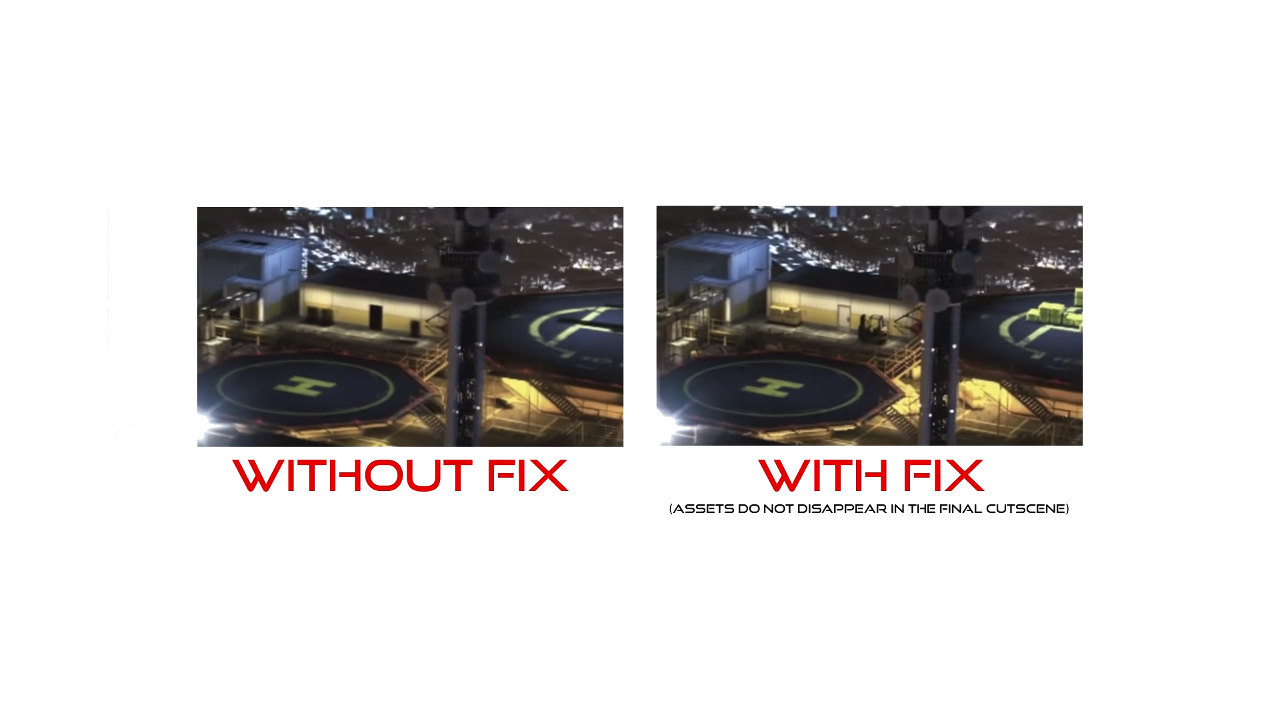
- This mod fixes draw distance issues that occur in the game's final cutscene.[6]
| Installation |
|---|
|
Game data

Configuration file(s) location
| System | Location |
|---|---|
| Windows | %USERPROFILE%\Documents\EA Games\Mirror's Edge\TdGame\Config\ |
| Microsoft Store | |
| Steam Play (Linux) | <SteamLibrary-folder>/steamapps/compatdata/17410/pfx/[Note 1] |
- Some settings can be also edited in the INI files stored in
<path-to-game>\TdGame\Config, but the game will fail to launch when modifying these files. This can be bypassed with Mirror's Edge Tweaks by applying theAllow config modspatch. MEMLA is another alternative, but is less stable due to its memory-based injection (it also doesn't work on Linux/Proton).[7] MEMLA can be launched directly from within Steam. To do that, add the"<path-to-game>\MEMLA.exe" %command%command line argument in the game properties.
Save game data location
| System | Location |
|---|---|
| Windows | %USERPROFILE%\Documents\EA Games\Mirror's Edge\TdGame\Savefiles\ |
| Microsoft Store | |
| Steam Play (Linux) | <SteamLibrary-folder>/steamapps/compatdata/17410/pfx/[Note 1] |
Save game cloud syncing
| System | Native | Notes |
|---|---|---|
| GOG Galaxy | ||
| Origin | Only NA version. | |
| OneDrive | Requires enabling backup of the Documents folder in OneDrive on all computers. | |
| Steam Cloud | ||
| Xbox Cloud |
Video

| Graphics feature | State | WSGF | Notes |
|---|---|---|---|
| Widescreen resolution | Static aspect 16:9. Use Mirror's Edge Tweaks or Flawless Widescreen to fix. | ||
| Multi-monitor | Use Flawless Widescreen. | ||
| Ultra-widescreen | Use Flawless Widescreen or Mirror's Edge Tweaks. | ||
| 4K Ultra HD | Use Mirror's Edge Tweaks to fix the blurry UI at higher resolutions. | ||
| Field of view (FOV) | Defaults to 90° but gets forced to 85° upon dying. Use Mirror's Edge Tweaks to fix.[8] | ||
| Windowed | See Windowed. | ||
| Borderless fullscreen windowed | See Windowed. | ||
| Anisotropic filtering (AF) | Adjusted by the setting Texture Detail, where High equals 4x and Highest equals 16x. | ||
| Anti-aliasing (AA) | Up to 8x MSAA and 16xQ CSAA. | ||
| High-fidelity upscaling | See the glossary page for potential workarounds. | ||
| Vertical sync (Vsync) | |||
| 60 FPS | |||
| 120+ FPS | Capped at 62 FPS. See High frame rate. | ||
| High dynamic range display (HDR) | See High dynamic range display (HDR). | ||
Windowed
| Use dxwrapper[9] |
|---|
Notes
|
| Use modded files, also fixes Alt+Tab ↹ "out of focus" crash on Windows 7+[10] |
|---|
Notes
|
| Use Custom Hotkeys[11] |
|---|
Bindings=(Name="#",Command="setres HxWx32W",Control=False,Shift=False,Alt=False)
Bindings=(Name="F2",Command="setres 1280x720x32W",Control=False,Shift=False,Alt=False) Notes
|
Anti-aliasing (AA)
| Force SGSSAA (Nvidia only)[12][13] |
|---|
|
| Force Transparency to MSAA Coverage (AMD only) |
|---|
|
High frame rate
- Frame rate is capped at 62 FPS.
| Use Mirror's Edge Tweaks to change the cap[14][15] |
|---|
|
Notes
|
High dynamic range display (HDR)
| Use Special K after installing DXVK (HDR-mod)[17] |
|---|
Notes
|
Ambient occlusion
| Force HBAO+ (Nvidia only)[18][19] |
|---|
|
Graphics tweaks
| Use Mirror's Edge Tweaks to tweak all other graphics options[20] |
|---|
|
Input


| Keyboard and mouse | State | Notes |
|---|---|---|
| Remapping | ||
| Mouse acceleration | Use Mirror's Edge Tweaks to disable mouse smoothing. | |
| Mouse sensitivity | ||
| Mouse input in menus | ||
| Mouse Y-axis inversion | ||
| Controller | ||
| Controller support | Also present on the GOG release, despite not being included in the feature list. | |
| Full controller support | ||
| Controller remapping | Can only switch between pre-defined layouts. | |
| Controller sensitivity | ||
| Controller Y-axis inversion |
| Controller types |
|---|
| XInput-compatible controllers | ||
|---|---|---|
| Xbox button prompts | ||
| Impulse Trigger vibration |
| PlayStation controllers | An XInput wrapper is required. Mirror's Edge Tweaks can enable the PS3 button prompts and provides the option to display the PS3 controller in the "Gamepad Setup" menu (the latter requiring TdGame Fix). The Sixaxis functionality from the PS3 version of the game is not available on PC. | |
|---|---|---|
| PlayStation button prompts | Use Mirror's Edge Tweaks | |
| Light bar support | ||
| Adaptive trigger support | ||
| DualSense haptic feedback support | ||
| Connection modes | ||
| Generic/other controllers |
|---|
| Additional information | ||
|---|---|---|
| Controller hotplugging | ||
| Haptic feedback | ||
| Digital movement supported | ||
| Simultaneous controller+KB/M |
Audio

| Audio feature | State | Notes |
|---|---|---|
| Separate volume controls | ||
| Surround sound | 7.0 is supported.[21] | |
| Subtitles | In Game Settings. | |
| Closed captions | ||
| Mute on focus lost | ||
| Royalty free audio |
Fix audio issues
| Override default audio renderer[22] |
|---|
Notes
|
| Increase number of audio channels[23] |
|---|
Notes
|
Localizations
- Asian languages may be region locked depending on store platform and CDN. Use Mirror's Edge Tweaks to automate switching between all supported languages. Language codes to be used for manual switching are provided in the notes. First value is for the registry setting, second one is for the files extension and path.
| Language | UI | Audio | Sub | Notes |
|---|---|---|---|---|
| English | en_UK (INT) |
|||
| Traditional Chinese | zh_TW (CHT) |
|||
| Simplified Chinese | zh_CN (CHS) |
|||
| Korean | ko_KR (KOR) |
|||
| Czech | cs (CZE) |
|||
| French | fr_FR (FRA) |
|||
| German | de_DE (DEU) |
|||
| Hungarian | hu_HU (HUN) |
|||
| Italian | it_IT (ITA) |
|||
| Japanese | ja_JP (JPN) |
|||
| Polish | pl_PL (POL) |
|||
| Brazilian Portuguese | pt_PT (POR) |
|||
| Russian | ru_RU (RUS) |
|||
| Spanish | es_ES (ESN) |
|||
| Turkish | Download here. |
| Fix missing FMV audio for Japanese/Polish languages[24] |
|---|
|
Independent dubbing and captioning
| Override language files |
|---|
Notes
|
Network
Multiplayer types
| Type | Native | Players | Notes | |
|---|---|---|---|---|
| Local play | 2 | Co-op Use the Splitting Edge Mod (in beta) |
||
| LAN play | ||||
| Online play | Use mmultiplayer | |||
VR support
| 3D modes | State | Notes | |
|---|---|---|---|
| vorpX | G3D, DirectVR Officially supported game, see official vorpx game list. |
||
Issues fixed
Controller icons while playing with M&K
| Unplug the controller[25] |
|---|
|
This is the only way to do it since the game doesn't have an option to disable it.[26] |
PhysX causes issues
- The PhysX enhanced effects are enormously taxing on the CPU due to using single-threaded X87 instructions[27] without an Nvidia GPU, may cause the game not to start or crash during gameplay, and may also cause performance issues on Nvidia GPUs due to the game using the older PhysX library files included in the game folder by default rather than the up to date ones from the driver.
| Install and enable the latest PhysX update[28] |
|---|
|
Game does not launch
- This can be caused by various issues, with the most prominent being a PhysX compatibility issue.
| See PhysX section for the most likely cause of crashes on launch[30] |
|---|
| Disable Mandatory ASLR for the game (Windows 10)[31] |
|---|
|
Crash just after splash screen
| Manually set resolution[32] |
|---|
|
| Disable default AA[33] |
|---|
|
Saves or settings don't actually get saved
| If Controlled folder access is enabled, add the game to the allowed apps list[34] |
|---|
No sound during cutscenes/FMVs in Windows 7
| Run the game in compatibility mode for Windows XP SP3.[citation needed] |
|---|
Merc's audio cuts off before end of sentence
| Disable GX mode in Xonar Audio Center[citation needed] |
|---|
|
Other information
API
| Technical specs | Supported | Notes |
|---|---|---|
| Direct3D | 9.0c | |
| Shader Model support | 3 |
| Executable | 32-bit | 64-bit | Notes |
|---|---|---|---|
| Windows |
Middleware
| Middleware | Notes | |
|---|---|---|
| Physics | PhysX | Version 2.8.0. Nvidia GPUs can accelerate optional physics effects like detailed debris and cloth. The simulation timestep can be increased for smoother physics rendering with the following mod.[35] |
| Audio | OpenAL, Speex | Ships with router version 6.14.357.22 and wrapper 2.2.0.5. Can be updated. |
| Interface | Scaleform | |
| Cutscenes | Bink Video | v1.9a |
Crosshair toggle
| Crosshair Toggle[citation needed] |
|---|
Bindings=(Name="F11",Command="Showhud",Control=False,Shift=False,Alt=False) |
Adding binoculars
| Binoculars tweak[citation needed] |
|---|
Bindings=(Name="ZoomIn1",Command="FOV 50 | setbind YYY ZoomIn2",Control=False,Shift=False,Alt=False)
Bindings=(Name="ZoomIn2",Command="FOV 30 | setbind YYY ZoomOut",Control=False,Shift=False,Alt=False)
Bindings=(Name="ZoomOut",Command="FOV XXX | setbind YYY ZoomIn1",Control=False,Shift=False,Alt=False)
Bindings=(Name="YYY",Command="ZoomIn1",Control=False,Shift=False,Alt=False)
where |
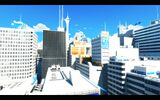
Default zoom (90 FOV).
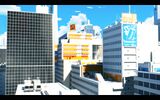
First stage (50 FOV).
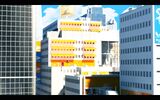
Second stage (30 FOV).


Low end configuration
| Use custom settings[36] |
|---|
[SystemSettings] StaticDecals=False DynamicDecals=False DynamicLights=False DynamicShadows=False LightEnvironmentShadows=False CompositeDynamicLights=False DirectionalLightmaps=False MotionBlur=false DepthOfField=False AmbientOcclusion=false Bloom=False QualityBloom=False Distortion=False DropParticleDistortion=False SpeedTreeLeaves=False SpeedTreeFronds=False OnlyStreamInTextures=False LensFlares=False FogVolumes=False FloatingPointRenderTargets=True Trilinear=False OneFrameThreadLag=True UseVsync=False UpscaleScreenPercentage=False Fullscreen=True AllowD3D10=False EnableHighPolyChars=False SkeletalMeshLODBias=0 ParticleLODBias=0 DetailMode=0 ShadowFilterQualityBias=-1 MaxAnisotropy=1 MaxMultisamples=1 MinShadowResolution=32 MaxShadowResolution=256 ResX=640 ResY=480 ScreenPercentage=100.000000 SceneCaptureStreamingMultiplier=0.800000 FoliageDrawRadiusMultiplier=0.000000 ShadowTexelsPerPixel=1.000000 TEXTUREGROUP_World=(MinLODSize=256,MaxLODSize=256,LODBias=1) TEXTUREGROUP_WorldNormalMap=(MinLODSize=256,MaxLODSize=256,LODBias=2) TEXTUREGROUP_WorldSpecular=(MinLODSize=256,MaxLODSize=256,LODBias=1) TEXTUREGROUP_Character=(MinLODSize=256,MaxLODSize=256,LODBias=1) TEXTUREGROUP_CharacterNormalMap=(MinLODSize=256,MaxLODSize=256,LODBias=2) TEXTUREGROUP_CharacterSpecular=(MinLODSize=256,MaxLODSize=256,LODBias=1) TEXTUREGROUP_Weapon=(MinLODSize=256,MaxLODSize=256,LODBias=1) TEXTUREGROUP_WeaponNormalMap=(MinLODSize=256,MaxLODSize=256,LODBias=2) TEXTUREGROUP_WeaponSpecular=(MinLODSize=256,MaxLODSize=256,LODBias=1) TEXTUREGROUP_Vehicle=(MinLODSize=256,MaxLODSize=256,LODBias=1) TEXTUREGROUP_VehicleNormalMap=(MinLODSize=256,MaxLODSize=256,LODBias=2) TEXTUREGROUP_VehicleSpecular=(MinLODSize=256,MaxLODSize=256,LODBias=1) TEXTUREGROUP_Cinematic=(MinLODSize=1,MaxLODSize=4096,LODBias=0) TEXTUREGROUP_Effects=(MinLODSize=256,MaxLODSize=256,LODBias=1) TEXTUREGROUP_Skybox=(MinLODSize=256,MaxLODSize=512,LODBias=1) TEXTUREGROUP_UI=(MinLODSize=1,MaxLODSize=4096,LODBias=0) TEXTUREGROUP_LightAndShadowMap=(MinLODSize=256,MaxLODSize=512,LODBias=1) TEXTUREGROUP_RenderTarget=(MinLODSize=1,MaxLODSize=4096,LODBias=1) PhysXEnhanced=False TdMotionBlur=False TdSunHaze=False TdTonemapping=False TdBicubicFiltering=False |
Modifications
Moded TdGame FIX 2.0
- Allows modification of the original game files without bugs and/or crashes.
- Needed by many community made creations.
Mirror's Edge cut ending recreation
| Install the custom level[37] |
|---|
|
Custom maps
| Use editor mode[38] |
|---|
|
Freedom Map
- Open world map with custom delivery objectives and police patrols.
- Very GPU and CPU taxing.
System requirements
| Windows | ||
|---|---|---|
| Minimum | Recommended | |
| Operating system (OS) | XP SP2 | Vista |
| Processor (CPU) | Intel Pentium 4 3.0 GHz | Intel Core 2 Duo 2.0 GHz |
| System memory (RAM) | 1 GB | 2 GB |
| Hard disk drive (HDD) | 8 GB | |
| Video card (GPU) | Nvidia GeForce 6800 ATI Radeon X1650 256 MB of VRAM DirectX 9.0c compatible Shader model 3.0 support |
Nvidia GeForce 8800 512 MB of VRAM |
- Nvidia GeForce 7300 is below the minimum requirements, integrated chipsets may experience issues.
- Laptop versions of these chipsets may work but are not supported.
Notes
- ↑ 1.0 1.1 Notes regarding Steam Play (Linux) data:
- File/folder structure within this directory reflects the path(s) listed for Windows and/or Steam game data.
- Use Wine's registry editor to access any Windows registry paths.
- The app ID (17410) may differ in some cases.
- Treat backslashes as forward slashes.
- See the glossary page for details on Windows data paths.
References
- ↑ 1.0 1.1 Electronic Arts Inc. - Mirror's Edge for PC Ships to Retail Stores Today - last accessed on 2023-12-15
- ↑ [https://www.deadendthrills.com/building-the-impossible-mirrors-edge Building The Impossible
The Art Of Mirror’s Edge] - last accessed on 2021-11-23
- "Help came in the form of rendering company Illuminate Labs, which at the time specialised in a Maya renderer – a global illumination lighting engine – called Turtle."
- ↑ Online Services Shutdown - last accessed on 2024-01-24
- ↑ archive.is - last accessed on May 2023
- ↑ 5.0 5.1 Verified by User:Thebradad1111 on 28 January 2017
- ↑ ModDB - Draw Distance Problem - last accessed on 2021-08-16
- ↑ How to make Mirror's Edge even HARDER or EASIER! :: Steam Community Guide - last accessed on May 2023
- ↑ Mirror's Edge - FOV Tool - last accessed on May 2023
- ↑ Configuration · elishacloud/dxwrapper Wiki - GitHub
- ↑ Мод опции на меню для полного и оконного режима. - Форум
- ↑ Known "console" commands for Mirror's Edge by nulaft
- ↑ NVidia Profile Inspector - AA Flags - Google Drive - last accessed on May 2023
- ↑ Antialiasing - Kompatibilitätsbits - Sammelthread - 3DCenter Forum
- ↑ Mirror's Edge Tweaks - QoL Improvements - YouTube - last accessed on June 2023
- ↑ Mirror's Edge - Unlocked PhysX framerates - YouTube - last accessed on June 2023
- ↑ Verified by User:Softsoundd on 2023-03-11
- ↑ DXVK (HDR-mod) - last accessed on July 2023
- ↑ HBAO+ Compatibility Flags - last accessed on May 2023
- ↑ Original HBAO+ Post at 3DCenter.org Forums - last accessed on May 2023
- ↑ Mirror's Edge Tweaks - New graphics configurations - YouTube - last accessed on July 2023
- ↑ PC Gaming Surround Sound Round-up - last accessed on May 2023
- ↑ Enable 3D Surround Sound for Stereo Headphones - last accessed on May 2023
- ↑ Mirror's Edge Tweaks — V3 - last accessed on March 2024
- ↑ Mirror's Edge Tweaks - Language Switcher + Cutscene Audio Fix - YouTube - last accessed on December 2023
- ↑ Verified by User:Faust8 on 2023-10-27
- ↑ Verified by User:Faust8 on 2023-10-27
- Tried with AllowJoystickInput=0 and it won't work.
- ↑ Analysis: PhysX On Systems With AMD Graphics Cards - last accessed on 2021-11-23
- ↑ PhsyX, Mirror's Edge, and You - Steam Users' Forums (retrieved)
- ↑ justinalex.com - last accessed on May 2023
- ↑ Verified by User:Aemony on 2023-08-31
- ↑ Game won't start, other solutions don't work. :: Steam Community Discussions - last accessed on May 2023
- ↑ [Possible Fix] Mirror's Edge Crash at Splash Screen - Steam Users' Forums (retrieved)
- ↑ PhsyX, Mirror's Edge, and You - Steam Users' Forums (retrieved)
- ↑ Doesn't Save :: Steam Community Discussions - last accessed on August 2023
- ↑ Unlocked PhysX framerates - last accessed on 2023-02-25
- ↑ Project Edge™; Enable Mirror's Edge™ to run on your low end system! - Steam Users' Forums (retrieved)
- ↑ Cut ending mod updated to v1.1 : mirrorsedge - Reddit - last accessed on May 2023
- ↑ On-Mirror's-Edge Forums / (TUTORIAL) How to open the unreal editor? (retrieved)