
Dead Space 3
From PCGamingWiki, the wiki about fixing PC games
 |
|
| Developers | |
|---|---|
| Visceral Games | |
| Publishers | |
| Electronic Arts | |
| Engines | |
| Visceral Engine | |
| Release dates | |
| Windows | February 5, 2013 |
| Reception | |
| Metacritic | 78 |
| IGDB | 74 |
| Taxonomy | |
| Monetization | One-time game purchase, DLC, Cross-game bonus, Subscription gaming service |
| Modes | Singleplayer, Multiplayer |
| Pacing | Real-time |
| Perspectives | Third-person |
| Controls | Direct control |
| Genres | Shooter, Survival horror |
| Art styles | Realistic |
| Themes | Horror, Sci-fi, Space |
| Series | Dead Space |
 |
|
| Dead Space | |
|---|---|
| Dead Space | 2008 |
| Dead Space 2 | 2011 |
| Dead Space 3 | 2013 |
| Dead Space (2023) | 2023 |
Dead Space 3 is a singleplayer and multiplayer third-person shooter and survival horror game in the Dead Space series.
General information
- Official forums
- Neoseeker Forums PC-specific
- Aegis7 forums non PC-specific, less active
- Steam Community Discussions
Availability
| Source | DRM | Notes | Keys | OS |
|---|---|---|---|---|
| Retail | |
2 DVDs. Limited Edition. | |
|
| Amazon.com | |
|
||
| Epic Games Store | |
|
||
| Microsoft Store | |
Included exclusively with Xbox Game Pass for PC as part of its version of EA Play. | |
|
| Origin | |
Included with EA Play. Manual link for EA App purchase. |
|
|
| Steam | |
Included with EA Play (Steam). | |
Monetization
| Type | Notes |
|---|---|
| Cross-game bonus | Having a Mass Effect 3 savegame on the PC, will unlock the N7 Suit and having a Dead Space 2 savegame unlocks the Planet Cracker Plasma Cutter. |
| DLC | The DLC adds missions, items and boosts. |
| One-time game purchase | The game requires an upfront purchase to access. |
| Subscription gaming service | Available via EA Play. |
DLC and expansion packs
| Name | Notes | |
|---|---|---|
| Awakened | |
|
| Tau Volantis Survival Kit | Includes: Tundra Recon Suit, Marauder Suit, Sharpshooter Suit, Aegis VII Survivalist, AL-9 Clearcutter, SMP-90 Sharpshooter and Bot Accelerator. | |
| Bot Capacity Upgrade | |
|
| Bot Accelerator | Included in the Tau Volantis Survival Kit pack. | |
| Bot Personality Pack | |
|
| EG-900 SMG | |
|
| Enervator | |
|
| First Contact Pack | Includes: First Contact Suit and Negotiator. Included with the Limited Edition | |
| Marauder Pack | Includes: Marauder Suit and AL-9 Clearcutter. Included in the Tau Volantis Survival Kit pack. | |
| Sharpshooter Pack | Includes: Sharpshooter Suit and SMP-90 Sharpshooter. Included in the Tau Volantis Survival Kit pack. | |
| Tundra Recon Pack | Includes: Tundra Recon Suit and Aegis VII Survivalist. Included in the Tau Volantis Survival Kit pack. | |
| Witness the Truth Pack | Includes: Witness Suit and Evangelizer. Included with the Limited Edition. | |
Game data
Configuration file(s) location
| System | Location |
|---|---|
| Windows | %LOCALAPPDATA%\EA Games\Dead Space 3\ |
| Microsoft Store | |
| Steam Play (Linux) | <SteamLibrary-folder>/steamapps/compatdata/1238060/pfx/[Note 1] |
Save game data location
| System | Location |
|---|---|
| Windows | %USERPROFILE%\Documents\EA Games\Dead Space 3\ |
| Microsoft Store | |
| Steam Play (Linux) | <SteamLibrary-folder>/steamapps/compatdata/1238060/pfx/[Note 1] |
- 5 player profiles available. Each player profile only has 1 save slot, but a chapter select feature is available.
Save game cloud syncing
| System | Native | Notes |
|---|---|---|
| Epic Games Launcher | ||
| Origin | ||
| OneDrive | Requires enabling backup of the Documents folder in OneDrive on all computers. | |
| Steam Cloud | ||
| Xbox Cloud |
Video

Graphics options.
| Graphics feature | State | WSGF | Notes |
|---|---|---|---|
| Widescreen resolution | |||
| Multi-monitor | Works with Nvidia Surround in 2D and 3D modes. | ||
| Ultra-widescreen | |||
| 4K Ultra HD | Subtitles scales poorly with resolution larger than 1280 pixels wide, making them too small in very high resolution. Untested Cheat Engine table for subtitle scaling. | ||
| Field of view (FOV) | Fixable through config file. See Field of view (FOV). | ||
| Windowed | |||
| Borderless fullscreen windowed | |||
| Anisotropic filtering (AF) | Up to 16 samples. | ||
| Anti-aliasing (AA) | Only post-process AA (FXAA, SMAA). | ||
| Vertical sync (Vsync) | Only 30 FPS lock. See the glossary page for proper Vsync. | ||
| 60 FPS and 120+ FPS | Very high frame rate (+30 FPS) potentially causes problems with QTEs, physics (specifically ragdoll) and animations. Running above 60 FPS may cause an infinite loading screen glitch upon death during co-op play. |
||
| High dynamic range display (HDR) | See the glossary page for potential alternatives. | ||
Field of view (FOV)
- There is deliberately no in-game option to modify the FOV.[citation needed]
| Edit config file to change FOV[citation needed] |
|---|
Notes
|
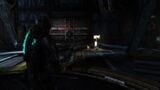
default FOV Scale (~75°)
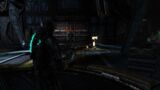
FOV Scale 1.1 (~82.5°)
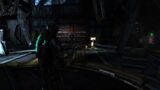
FOV Scale 1.2 (~90°)
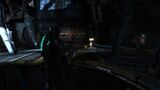
FOV Scale 1.3 (~97.5°)
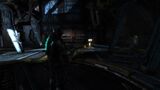
FOV Scale 1.4 (~105°)

Border in one cutscene.


Input
| Keyboard and mouse | State | Notes |
|---|---|---|
| Remapping | ||
| Mouse acceleration | Positive and negative mouse acceleration. | |
| Mouse sensitivity | ||
| Mouse input in menus | ||
| Mouse Y-axis inversion | ||
| Controller | ||
| Controller support | ||
| Full controller support | ||
| Controller remapping | See the glossary page for potential workarounds. | |
| Controller sensitivity | ||
| Controller Y-axis inversion |
| Controller types |
|---|
| XInput-compatible controllers | ||
|---|---|---|
| Xbox button prompts | ||
| Impulse Trigger vibration |
| PlayStation controllers | ||
|---|---|---|
| PlayStation button prompts | ||
| Light bar support | ||
| Adaptive trigger support | ||
| DualSense haptic feedback support | ||
| Connection modes | ||
| Generic/other controllers |
|---|
| Additional information | ||
|---|---|---|
| Controller hotplugging | ||
| Haptic feedback | ||
| Digital movement supported | ||
| Simultaneous controller+KB/M |
Mouse smoothing
- Dead Space 3 suffers from floaty mouse movement, which becomes more pronounced the higher the frame rate.
| Turn off mouse smoothing[citation needed] |
|---|
|
Audio
| Audio feature | State | Notes |
|---|---|---|
| Separate volume controls | ||
| Surround sound | Up to 5.1 output.[1] | |
| Subtitles | ||
| Closed captions | ||
| Mute on focus lost | ||
| Royalty free audio | Combination of original and licensed tracks by Extreme Music Library Ltd. Credits use the track "Ephemeral" from the album "What We All Come to Need". |
Localizations
| Language | UI | Audio | Sub | Notes |
|---|---|---|---|---|
| English | ||||
| French | ||||
| German | ||||
| Hungarian | Fan translation, download. | |||
| Italian | ||||
| Polish | Fan translation, download here for the base game and here For the DLC. | |||
| Brazilian Portuguese | Fan translation, download. | |||
| Russian | ||||
| Spanish |
Network
Multiplayer types
| Type | Native | Players | Notes | |
|---|---|---|---|---|
| LAN play | ||||
| Online play | 2 | Co-op Co-op campaign.[2] |
||
VR support
| 3D modes | State | Notes | |
|---|---|---|---|
| Nvidia 3D Vision | See Helix Mod: Dead Space 3 - 3D Vision fix. | ||
| vorpX | G3D Officially supported game, see official vorpx game list. |
||
Issues unresolved
Cannot retrieve information from Origin error when accessing DLC store ingame
- Several users affected by the issue have started posting tracerouting logs of their connection to the Origin servers to help EA identify the cause of the issue[3]
- EA has responded to this issue with a workaround[4]
- Many users are reporting that the workaround does not fix the issue[5][6]
Possible fixes:
- Uninstall Origin and reinstall the latest version
- Run Origin as administrator
- Add Dead Space 3 and Origin to your firewall's exception list
- Port forward the following ports:
| TCP | UDP |
|---|---|
| 80 | 3659 |
| 443 | 14000-14016 |
| 9988 | 22990-23006 |
| 20000-20100 | 25200-25300 |
| 22990 | |
| 17502 | |
| 42127 |
Issues fixed
In-game stuttering, freezing issues
- When using VSync,the game places most of its processing load on the first CPU core only(typically 99%) which may cause stuttering and occasional framerate dips on some systems while traversing through the map
Making affinity changes permanent (setting affinity in task manager only lasts until you exit the game):
- Edit your preferred shortcut for launching the game (desktop and/or start menu)
- In the target field, set the following (just put the default contents in double quotes and prepend cmd.exe /C ...):
- For a 4/4 (core/thread) CPU
cmd.exe /C start "" /affinity e "<path-to-game>\deadspace3.exe" - For a 4/8 and 8/8 (core/thread) CPU
cmd.exe /C start "" /affinity fe "<path-to-game>\deadspace3.exe" - For a 6/6 (core/thread) CPU
cmd.exe /C start "" /affinity 3e "<path-to-game>\deadspace3.exe" - For a 6/12 (core/thread) CPU
cmd.exe /C start "" /affinity 7fe "<path-to-game>\deadspace3.exe" - For a 8/16 (core/thread) CPU and higher
cmd.exe /C start "" /affinity fffe "<path-to-game>\deadspace3.exe"
Verify correct affinity by launching the game and checking affinity in task manager (see beginning).
To be used in Steam launch options, to launch the game directly from Steam, it must be a little different:
- Ex. for a 8/16 (core/thread) CPU and higher
C:\Windows\System32\cmd.exe /C start "" /affinity FFFE "<path-to-game>\deadspace3.exe" %command%
Kinesis Door Audio Bug
| Use Kinesis Door Audio Stutter FIX[citation needed] |
|---|
|
Other information
API
| Technical specs | Supported | Notes |
|---|---|---|
| Direct3D | 9.0c | |
| Shader Model support | 3 |
| Executable | 32-bit | 64-bit | Notes |
|---|---|---|---|
| Windows |
Middleware
| Middleware | Notes | |
|---|---|---|
| Physics | Havok | |
| Audio | RwAudioCore | [1] |
System requirements
| Windows | ||
|---|---|---|
| Minimum | ||
| Operating system (OS) | XP SP3, Vista SP1, 7 | |
| Processor (CPU) | 2.8 GHz | |
| System memory (RAM) | 1 GB (XP) 2 GB (Vista, 7) |
|
| Hard disk drive (HDD) | 10 GB | |
| Video card (GPU) | Nvidia GeForce 6800 ATI Radeon X1600 Pro 256 MB of VRAM DirectX 9.0c compatible Shader model 3.0 support |
|
Notes
- ↑ 1.0 1.1 Notes regarding Steam Play (Linux) data:
- File/folder structure within this directory reflects the path(s) listed for Windows and/or Steam game data.
- Use Wine's registry editor to access any Windows registry paths.
- The app ID (1238060) may differ in some cases.
- Treat backslashes as forward slashes.
- See the glossary page for details on Windows data paths.
References
- ↑ 1.0 1.1 PC Gaming Surround Sound Round-up
- ↑ Dead Space 3 - Dead Space 3 Co-Op FAQ - last accessed on May 2023
- ↑ http://answers.ea.com/t5/Dead-Space-3/Downloadable-Contents-Connection-Issue/m-p/1401320/highlight/true#M7326
- ↑ http://answers.ea.com/t5/Dead-Space-3/Unable-to-access-Downloadable-Content-in-Dead-Space-3-Limited/m-p/476536/highlight/true#M565
- ↑ http://answers.ea.com/t5/Dead-Space-3/Unable-to-access-Downloadable-Content-in-Dead-Space-3-Limited/m-p/476612/highlight/true#M573
- ↑ http://answers.ea.com/t5/Dead-Space-3/Downloadable-Contents-Connection-Issue/m-p/475760/highlight/true#M500
- ↑ answers.ea.com - last accessed on May 2023
- ↑ https://www.youtube.com/watch?v=XYIYcjbVJFI